Majorsoft.Blazor.Components.PermaLink
2.3.0
dotnet add package Majorsoft.Blazor.Components.PermaLink --version 2.3.0
NuGet\Install-Package Majorsoft.Blazor.Components.PermaLink -Version 2.3.0
<PackageReference Include="Majorsoft.Blazor.Components.PermaLink" Version="2.3.0" />
<PackageVersion Include="Majorsoft.Blazor.Components.PermaLink" Version="2.3.0" />
<PackageReference Include="Majorsoft.Blazor.Components.PermaLink" />
paket add Majorsoft.Blazor.Components.PermaLink --version 2.3.0
#r "nuget: Majorsoft.Blazor.Components.PermaLink, 2.3.0"
#:package Majorsoft.Blazor.Components.PermaLink@2.3.0
#addin nuget:?package=Majorsoft.Blazor.Components.PermaLink&version=2.3.0
#tool nuget:?package=Majorsoft.Blazor.Components.PermaLink&version=2.3.0
Blazor Components PermaLink control and extension



About
Blazor injectable IPermaLinkWatcherService service and PermaLinkElement wrapper component which allows navigation inside Blazor pages (#permalink).
All components work with WebAssembly and Server hosted models (Blazor server side configuration is different). For code examples see usage.
You can try it out by using the demo app.
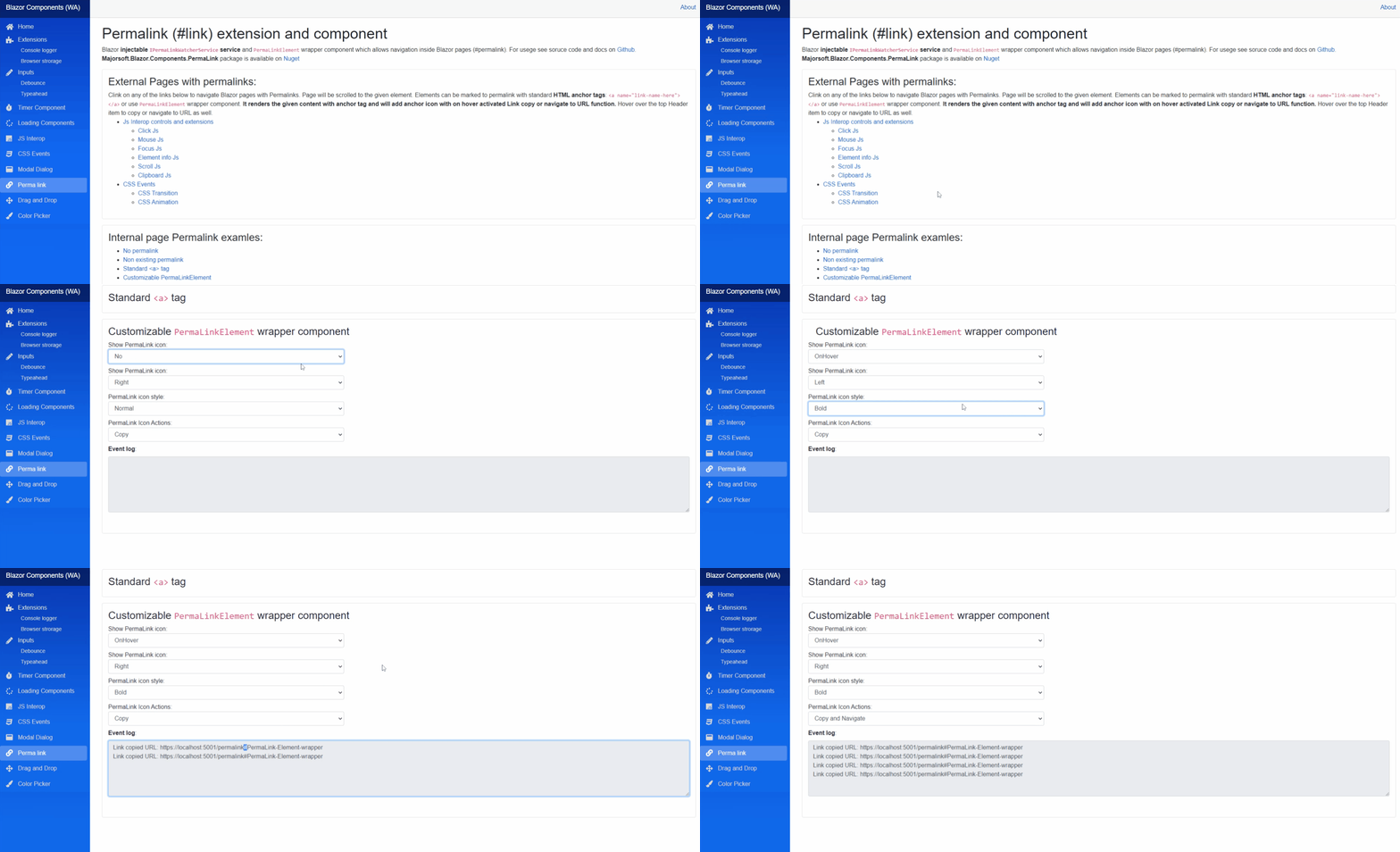
Components and Services
PermaLinkElement: is a wrapper component it renders the given content with<a>tag and will add anchor icon with on hover activated Link copy function. Hover over the top Header item to copy or navigate to URL as well.IPermaLinkWatcherService: is registered as Singleton and should be injected only once for the whole application. Best way to useMainLayout.razor.PermaLinkBlazorServerInitializer: (from v1.4.0) convenient wrapper component to initialize navigation watcher in your Blazor Server AppMainLayout.razorpage. Only one Initializer component allowed per Application.PermalinkBlazorWasmInitializer: (from v1.4.0) convenient wrapper component to initialize navigation watcher in your Blazor WebAssembly AppMainLayout.razorpage. Only one Initializer component allowed per Application.
IPermaLinkWatcherService extension
This is the main service which makes Permalink navigation possible. Should be used as a Singleton only in MainLayout.razor file.
For more details see Usage section.
Functions
WatchPermaLinksAsync():Task WatchPermaLinksAsync()<br /> Starts a navigation watcher which will check for Permalinks in the URLs.ChangePermalink():void ChangePermalink(string? newPermalink, bool doNotNavigate)<br /> Modify the current URL with given new peralink value and trigger navigation or just update browser History.CheckPermalink():string? CheckPermalink(bool triggerEvent = false)<br /> Checks the current URL for permalink again and re-triggersPermalinkDetectedevent if requested.Dispose():@implements IDisposableinterface <br /> Component implementsIDisposableinterface Blazor framework will call it when parent removed from render tree.
Events
PermalinkDetected: `event EventHandler<PermalinkDetectedEventArgs> <br /> Event handler for parmalinks detected on navigation.
PermaLinkElement component
Properties
Id:string { get; }<br /> Map HTML container Id. It can be used when multiple Permalinks added to one page.Content:RenderFragmentHTML content - Required <br /> Required HTML content to render with mouse enter/leave events to show Permalink icon. NOTE: it can be any arbitrary HTML elemnt but should be just a header text e.g.<h1> - <h6>element.PermaLinkName:string PermaLinkName { get; set; }- Required <br /> Value of the rendered<a>HTML tag. NOTE: it is required and will be part of the URL, do not add#use non URL friendly characters!ShowIcon:ShowPermaLinkIcon ShowIcon { get; set; }- (default: enumShowPermaLinkIcon.OnHover) <br /> Enum value which sets how to show clickable permalink the icon:No,OnHover,Always.IconPosition:PermaLinkIconPosition IconPosition { get; set; }- (default: enumPermaLinkIconPosition.Right) <br /> Enum value which sets where to show the icon:Left,Right.IconMarginTop:double IconMarginTop { get; set; }- (default: 0) <br /> Sets the iconmargin-topCSS property inpx. With this icon can be centered.IconSize:int IconSize { get; set; }- (default: 16) <br /> Sets the icon<img width="" height="" />values.IconStyle:PermaLinkStyle IconStyle { get; set; }- (default: enumPermaLinkStyle.Normal) <br /> Enum value which sets the displayed icon type:Normal,Bold.IconActions:PermaLinkIconActions IconActions { get; set; }- (default: FLAG enumPermaLinkIconActions.Copy) <br /> FLAG Enum value which sets the behaviour of the icon click:Copy,Navigate. Flag values can be combined:PermaLinkIconActions.Copy|PermaLinkIconActions.Navigate.InnerElementReference:ElementReference { get; }<br /> Exposes a BlazorElementReferenceof the wrapped around HTML element. It can be used e.g. for JS interop, etc.
Arbitrary HTML attributes e.g.: id="btn1" will be passed to the corresponding rendered <div> HTML element wrapper.
Events
OnLoading:EventCallbackdelegate <br /> Callback function called when Permalink icon clicked andPermaLinkIconActions.Copyfeature was set.
PermaLinkBlazorServerInitializer
Available from v1.4.0 It is convenient wrapper component to initialize navigation watcher in your Blazor Server App MainLayout.razor page. Only one Initializer component allowed per Application.
Properties
SmootScroll:bool { get; set; }(default: false) <br /> Scroll should be jump or smoothly scroll. Note: smooth scroll on element level might not supported by all browsers.
PermalinkBlazorWasmInitializer
Available from v1.4.0 It is convenient wrapper component to initialize navigation watcher in your Blazor WebAssembly App MainLayout.razor page. Only one Initializer component allowed per Application.
Properties
SmootScroll:bool { get; set; }(default: false) <br /> Scroll should be jump or smoothly scroll. Note: smooth scroll on element level might not supported by all browsers.
Configuration
Installation
Majorsoft.Blazor.Components.PermaLink is available on NuGet.
dotnet add package Majorsoft.Blazor.Components.PermaLink
Use the --version option to specify a preview version to install.
Usage
Add using statement to your Blazor <component/page>.razor file. Or globally reference it into _Imports.razor file.
@using Majorsoft.Blazor.Components.PermaLink
Dependences
Majorsoft.Blazor.Components.PermaLink package depends on other Majorsoft Nuget packages:
- Majorsoft.Blazor.Components.Common.JsInterop which handles JS Interop for many features e.g. scrolling, etc.
WebAssembly projects
In case of WebAssembly project register services in your Program.cs file:
using Majorsoft.Blazor.Components.Common.JsInterop;
using Majorsoft.Blazor.Components.PermaLink;
...
public static async Task Main(string[] args)
{
	var builder = WebAssemblyHostBuilder.CreateDefault(args);

	//Register dependencies
	builder.Services.AddJsInteropExtensions();
	//Register service
	builder.Services.AddPermaLinkWatcher();
}
Use MainLayout.razor file for WebAssembly project to activate Permalink watcher only once:
Inject the single instance of IPermaLinkWatcherService to activate Permalink watcher in OnInitialized method.
Also instance should be disposed.
@using Majorsoft.Blazor.Components.PermaLink

@inject IPermaLinkWatcherService _permalinkWatcher

@implements IDisposable

@code {
	protected override async Task OnInitializedAsync()
	{
		await _permalinkWatcher.WatchPermaLinksAsync();
	}

	public void Dispose()
	{
		_permalinkWatcher.Dispose();
	}
}
From v1.4.0 a simpler initializer is available! Only one Initializer component allowed per Application.
@*Permalink initialize*@
@using Majorsoft.Blazor.Components.PermaLink
<PermalinkBlazorWasmInitializer  SmoothScroll="false" />
Server hosted projects
In case of Server hosted project register dependency services in your Startup.cs file:
NOTE: PermaLinkWatcher cannot be added here!
using Majorsoft.Blazor.Components.Common.JsInterop;
...

public void ConfigureServices(IServiceCollection services)
{
	//Register dependencies
	services.AddJsInteropExtensions();
	//DO NOT Register AddPermaLinkWatcher here!!!!
}
Use MainLayout.razor file for Server hosted project to activate Permalink watcher only once:
Imprortant Note: IPermaLinkWatcherService instance cannot be injected in case of Server hosted projects!
It has to be instantiated manually by using the following code. Also instance should be disposed:
@using Majorsoft.Blazor.Components.PermaLink
@using Majorsoft.Blazor.Components.Common.JsInterop.Scroll
@using Microsoft.AspNetCore.Components.Routing

@inject IScrollHandler _scrollHandler
@inject NavigationManager _navigationManager
@inject ILogger<IPermaLinkWatcherService> _logger

@implements IDisposable
@implements IAsyncDisposable

@code{
	private IPermaLinkWatcherService _permalinkWatcher;
	protected override async Task OnAfterRenderAsync(bool firstRender)
	{
		if(firstRender)
		{
			//setup permalink
			_permalinkWatcher = new PermaLinkWatcherService(_scrollHandler, _navigationManager, _logger);
			await _permalinkWatcher.WatchPermaLinksAsync();
		}
	}

	public async ValueTask DisposeAsync()
	{
		if (_scrollHandler is not null)
		{
			await _scrollHandler.DisposeAsync();
		}
	}
	public void Dispose()
	{
		_permalinkWatcher?.Dispose();
	}
}
From v2.1.0 project is .NET 6.0 or later. Which does not support the URL fragment navigation. Because of this activation method is now async WatchPermaLinksAsync().
Method is now using polling, since no event fired by the Framework when URL fragment changed. Recommended to check your app performance. If you are using the Initializer components below, then no code changes needed.
From v1.4.0 a simpler initializer is available! Only one Initializer component allowed per Application.
@*Permalink initialize*@
@using Majorsoft.Blazor.Components.PermaLink
<PermaLinkBlazorServerInitializer SmoothScroll="false" />
Creating permalink (#) navigation points inside a Blazor page
This is a standard HTML a tag. Apply the well known <a name="your-section-name"></a> anchor element in your document
which should be activated when Navigation happened.
NOTE: Please do not add # or (space) or any other characters which are not URL compatible. Or you have to encode it.
Using PermaLinkElement component
It will render the given content and also generate the same standard a tag before it. One advantage of using this component it can render
a clickable Link icon which will copy the URL and/or navigate to the permalink.
<PermaLinkElement
	PermaLinkName="PermaLink-Element-wrapper"
	ShowIcon="@_showIcon"
	IconPosition="@_iconPosition"
	IconActions="@(_action)"
	IconStyle="_iconStyle"
	IconSize="18"
	IconMarginTop="7"
	OnPermaLinkCopied="@LinkCopied">
	<Content>
		<h3>Header item with permalink action icon</h3>
	</Content>
</PermaLinkElement>

@code{
	private ShowPermaLinkIcon _showIcon = ShowPermaLinkIcon.OnHover;
	private PermaLinkIconPosition _iconPosition = PermaLinkIconPosition.Right;
	private PermaLinkStyle _iconStyle;
	private PermaLinkIconActions _action = PermaLinkIconActions.Copy|PermaLinkIconActions.Navigate;

	private async Task LinkCopied(string uri)
	{
		//Custom code for copy to Clipboard...
	}
}
| Product | Versions Compatible and additional computed target framework versions. |
|---|---|
| .NET | net8.0 is compatible. net8.0-android was computed. net8.0-browser was computed. net8.0-ios was computed. net8.0-maccatalyst was computed. net8.0-macos was computed. net8.0-tvos was computed. net8.0-windows was computed. net9.0 is compatible. net9.0-android was computed. net9.0-browser was computed. net9.0-ios was computed. net9.0-maccatalyst was computed. net9.0-macos was computed. net9.0-tvos was computed. net9.0-windows was computed. net10.0 is compatible. net10.0-android was computed. net10.0-browser was computed. net10.0-ios was computed. net10.0-maccatalyst was computed. net10.0-macos was computed. net10.0-tvos was computed. net10.0-windows was computed. |
-
net10.0
- Majorsoft.Blazor.Components.Common.JsInterop (>= 2.3.0)
- Microsoft.AspNetCore.Components.Web (>= 10.0.8)
-
net8.0
- Majorsoft.Blazor.Components.Common.JsInterop (>= 2.3.0)
- Microsoft.AspNetCore.Components.Web (>= 8.0.27)
-
net9.0
- Majorsoft.Blazor.Components.Common.JsInterop (>= 2.3.0)
- Microsoft.AspNetCore.Components.Web (>= 9.0.16)
NuGet packages (1)
Showing the top 1 NuGet packages that depend on Majorsoft.Blazor.Components.PermaLink:
| Package | Downloads |
|---|---|
|
Majorsoft.Blazor.Components.Tabs
Blazor Components by Imre Toth |
GitHub repositories
This package is not used by any popular GitHub repositories.
| Version | Downloads | Last Updated |
|---|---|---|
| 2.3.0 | 164 | 8/8/2026 |
| 2.2.0 | 212 | 7/7/2026 |
| 2.1.0 | 177 | 5/27/2026 |
| 2.0.0 | 185 | 5/19/2026 |
| 1.6.1 | 182 | 3/27/2026 |
| 1.6.0 | 168 | 3/26/2026 |
| 1.5.0 | 2,958 | 8/27/2021 |
| 1.4.0 | 684 | 7/15/2021 |
| 1.3.0 | 786 | 3/10/2021 |
| 1.2.0 | 781 | 1/5/2021 |
| 1.1.0 | 692 | 12/18/2020 |
| 1.0.1 | 744 | 11/30/2020 |
| 1.0.0 | 725 | 11/11/2020 |
| 0.9.52-rc.2.20479.15 | 471 | 10/30/2020 |
See Releases here: https://github.com/majorimi/blazor-components/releases