NuGetizer 1.5.1
dotnet add package NuGetizer --version 1.5.1
NuGet\Install-Package NuGetizer -Version 1.5.1
<PackageReference Include="NuGetizer" Version="1.5.1"> <PrivateAssets>all</PrivateAssets> <IncludeAssets>runtime; build; native; contentfiles; analyzers</IncludeAssets> </PackageReference>
<PackageVersion Include="NuGetizer" Version="1.5.1" />
<PackageReference Include="NuGetizer"> <PrivateAssets>all</PrivateAssets> <IncludeAssets>runtime; build; native; contentfiles; analyzers</IncludeAssets> </PackageReference>
paket add NuGetizer --version 1.5.1
#r "nuget: NuGetizer, 1.5.1"
#:package NuGetizer@1.5.1
#addin nuget:?package=NuGetizer&version=1.5.1
#tool nuget:?package=NuGetizer&version=1.5.1


NuGetizer is a drop-in replacement for the .NET SDK built-in Pack (a.k.a. "SDK Pack") which instantly supercharges your ability to customize and extend the packing process in a consistent and easy to understand process designed and centered around best practices in MSBuild design and extensibility.
Yes, this means you'll never need to write a .nuspec by hand ever again, no matter how complicated or advanced your packing scenarios are.
Open Source Maintenance Fee
To ensure the long-term sustainability of this project, users of this package who generate revenue must pay an Open Source Maintenance Fee. While the source code is freely available under the terms of the License, this package and other aspects of the project require adherence to the Maintenance Fee.
To pay the Maintenance Fee, become a Sponsor at the proper OSMF tier. A single fee covers all of Devlooped packages.
Overview
Comprehensive and intuitive heuristics built from experience building nuget packages for over a decade make getting started with NuGetizer seamless and easy, while still accomodating the most advanced scenarios through plain MSBuild extensibility. Out of the box, NuGetizer supports:
- Drop-in replacement for the built-in .NET SDK Pack
- Packing project references (including transitive references)
- Straightforward support for smart libraries packing needs
- Packing multi-targeted projects, including framework-specific resources and dependencies
- Fast iterative development with complementary dotnet-nugetize command line tool
- Comprehensive diagnostic analyzers to provide guidance on packing best practices
- Consistent and predictable naming for package content inference behaviors:
Pack=[true|false]⇒ Include/exclude from package (on any item, such asPackageReference,ProjectReference,None,Content, etc.)PackFolder=[folder]⇒ Name of known folders with special behavior, such asLib,Build,Content,Tools, etc. (as a project property or item metadata)PackagePath=[path]⇒ Package-relative path (on any item, such asNone,Content, etc.)Pack[Item Type]=[true|false]⇒ Set default pack behavior for all items of a given type via simple properties (such asPackNone,PackContent,PackBuildOutput,PackDependencies,PackFrameworkReferences,PackEmbeddedResource,PackResourceetc.)
- Packaging projects using
.msbuildprojand Microsoft.Build.NoTargets SDK - SourceLink support to populate repository information in the package
- Automatic
readme.mdinclusion in the package - Support for content includes in readme
- Package validation enabled by default for release multi-targeting packages.
It's strongly recommended that you install the dotnet-nugetize tool to get the best experience with NuGetizer:
dotnet tool install -g dotnet-nugetize
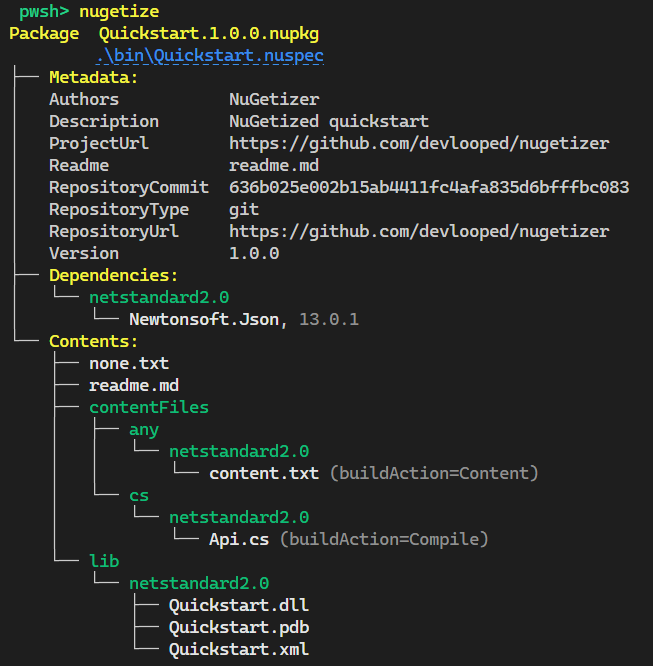
Given the following project:
<Project Sdk="Microsoft.NET.Sdk">

  <PropertyGroup>
    <TargetFramework>netstandard2.0</TargetFramework>
    <GenerateDocumentationFile>true</GenerateDocumentationFile>

    <PackageId>Quickstart</PackageId>
    <Authors>NuGetizer</Authors>
    <Description>NuGetized quickstart</Description>

    <PublishRepositoryUrl>true</PublishRepositoryUrl>
  </PropertyGroup>

  <ItemGroup>
    <PackageReference Include="NuGetizer" />
    <PackageReference Include="Microsoft.SourceLink.GitHub" Version="1.1.1"
                      PrivateAssets="all" />
    <PackageReference Include="Newtonsoft.Json" Version="13.0.1" />
  </ItemGroup>

  <ItemGroup>
    <None Include="none.txt" Pack="true" />
    <Content Include="content.txt" Pack="true" />
    <Compile Update="@(Compile)" Pack="true" />
  </ItemGroup>

</Project>
Running nugetize on the project directory will produce:
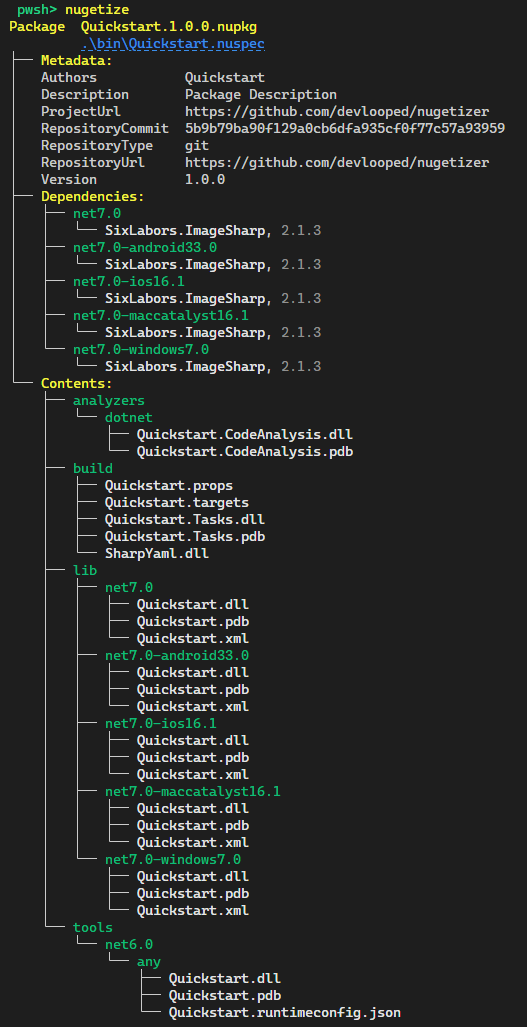
A typical packaging .msbuildproj project for a smart multi-targeted library might look like the following:
<Project Sdk="Microsoft.Build.NoTargets/3.7.0">

  <PropertyGroup>
    <PackageId>Quickstart</PackageId>
    <TargetFramework>netstandard2.0</TargetFramework>
  </PropertyGroup>

  <ItemGroup>
    <PackageReference Include="NuGetizer" />
    <PackageReference Include="Microsoft.SourceLink.GitHub" Version="1.1.1"
                      PrivateAssets="all" />
  </ItemGroup>

  <ItemGroup>
    <ProjectReference Include="..\Analyzer\Quickstart.CodeAnalysis.csproj" />
    <ProjectReference Include="..\Build\Quickstart.Tasks.csproj" />
    <ProjectReference Include="..\Lib\Quickstart.csproj" />
    <ProjectReference Include="..\Tools\Quickstart.csproj" />
  </ItemGroup>

</Project>
And produce the following nugetize tool output:
You can open this sample and run it directly in your browser in a

Learn more about NuGetizer and its capabilities from the project documentation site.
Sponsors


Learn more about Target Frameworks and .NET Standard.
-
.NETStandard 2.0
- Readme (>= 1.2.0)
NuGet packages
This package is not used by any NuGet packages.
GitHub repositories (15)
Showing the top 15 popular GitHub repositories that depend on NuGetizer:
| Repository | Stars |
|---|---|
|
devlooped/moq
The most popular and friendly mocking framework for .NET
|
|
|
LitJSON/litjson
JSON library for the .Net framework
|
|
|
MonoMod/MonoMod
C# modding swiss army knife, powered by cecil.
|
|
|
moq/labs
The most popular and friendly mocking framework for .NET
|
|
|
yoshiask/FluentStore
A unifying frontend for Windows app stores and package managers
|
|
|
devlooped/ThisAssembly
Expose project and assembly level information as constants in the ThisAssembly class using source generators powered by Roslyn.
|
|
|
jsuarezruiz/TemplateUI
A set of Xamarin.Forms templated controls.
|
|
|
Mutagen-Modding/Synthesis
A patcher pipeline framework and GUI. Run collections of code-based mods to create content customized for your load order
|
|
|
devlooped/SmallSharp
Create, edit and run multiple C# top-level programs in the same project by just selecting the startup program from the start button.
|
|
|
xamarin/mqtt
Minimalist and intuitive MQTT broker and client written entirely in C#
|
|
|
dreamanlan/CSharpGameFramework
基于unity3d引擎与c#语言的游戏框架/架构(包括客户端与服务器)。使用ServerPlatform作为服务端通信基础设施。
|
|
|
dansiegel/Mobile.BuildTools
The Mobile.BuildTools makes it easier to develop code bases in a clean, consistent, secure, and configurable way. Determine at Build which environment your app needs to run on, and what Client Secrets it should have. Plus many more amazing features!
|
|
|
serdedotnet/serde
Serde.NET is a C# port of the popular Serde serialization library for Rust
|
|
|
devlooped/stunts
A modern compile-time generated interception/proxy library
|
|
|
devlooped/NuDoq
A standalone API to read .NET XML documentation files and optionally augment it with reflection information.
|
| Version | Downloads | Last Updated |
|---|---|---|
| 1.5.1 | 1,753 | 9/28/2026 |
| 1.5.0 | 11,755 | 8/6/2026 |
| 1.4.9 | 19,407 | 6/25/2026 |
| 1.4.7 | 74,627 | 1/14/2026 |
| 1.4.6 | 21,729 | 11/6/2025 |
| 1.4.5 | 11,714 | 10/17/2025 |
| 1.4.4 | 2,090 | 10/16/2025 |
| 1.4.3 | 3,173 | 10/16/2025 |
| 1.4.2 | 2,640 | 10/16/2025 |
| 1.3.1 | 6,452 | 9/28/2025 |
| 1.3.0 | 123,796 | 7/21/2025 |
| 1.2.4 | 138,353 | 11/25/2024 |
| 1.2.3 | 182,279 | 8/9/2024 |
| 1.2.2 | 85,921 | 5/17/2024 |
| 1.2.1 | 88,475 | 11/30/2023 |
| 1.2.0 | 47,862 | 10/11/2023 |
| 1.1.1 | 11,284 | 8/28/2023 |