JackDebug.WPF
2.0.0
dotnet add package JackDebug.WPF --version 2.0.0
NuGet\Install-Package JackDebug.WPF -Version 2.0.0
<PackageReference Include="JackDebug.WPF" Version="2.0.0" />
<PackageVersion Include="JackDebug.WPF" Version="2.0.0" />
<PackageReference Include="JackDebug.WPF" />
paket add JackDebug.WPF --version 2.0.0
#r "nuget: JackDebug.WPF, 2.0.0"
#:package JackDebug.WPF@2.0.0
#addin nuget:?package=JackDebug.WPF&version=2.0.0
#tool nuget:?package=JackDebug.WPF&version=2.0.0
heirowDebug
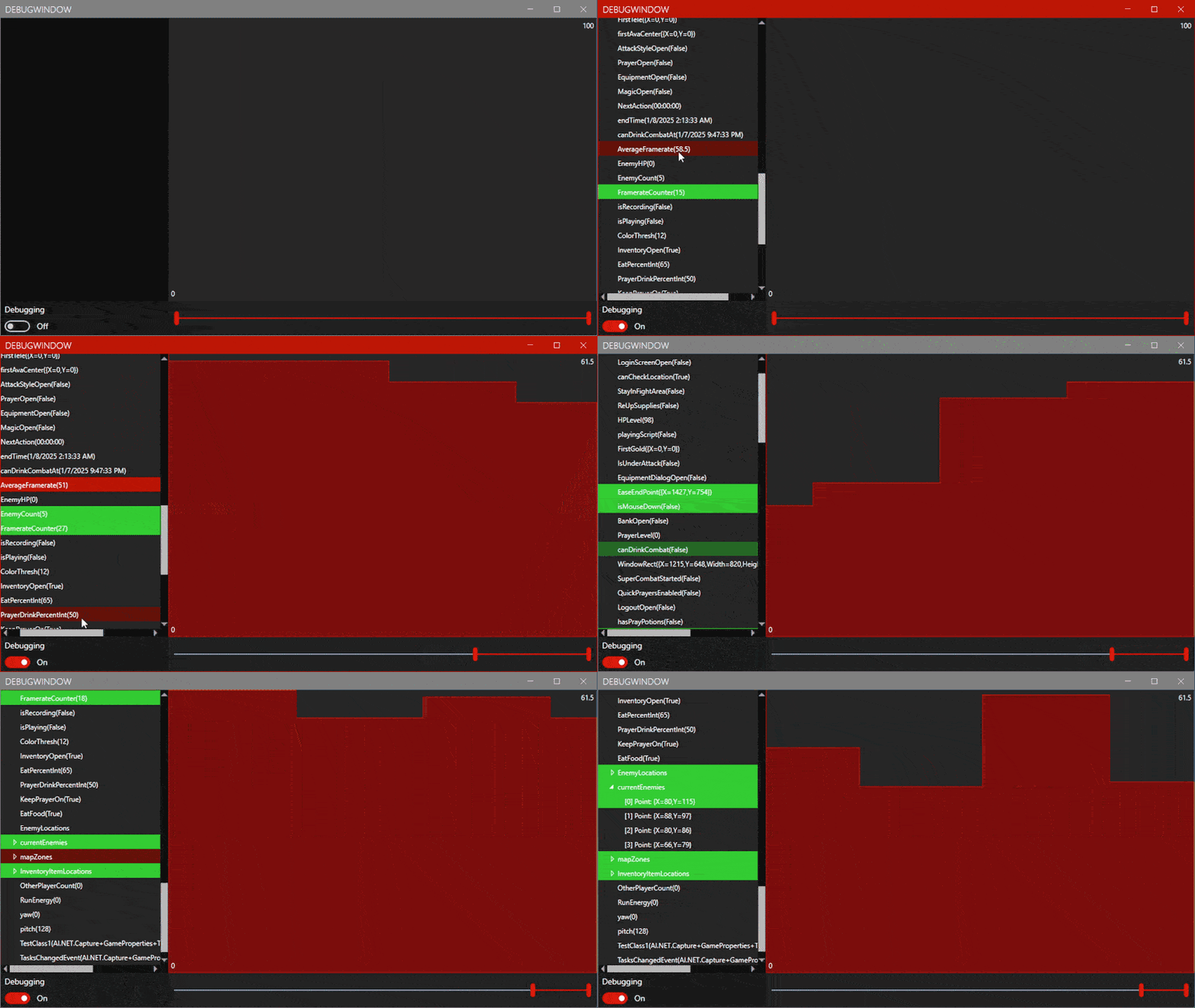
heirowDebug is a live object value visualizer for WPF applications. Launch heirowDebug.exe to select an application to debug. The compatible library and NuGet identity remain JackDebug.WPF.
New brand artwork and generation prompts are documented in Assets/README.md.
Setup
https://www.nuget.org/packages/JackDebug.WPF
dotnet add package JackDebug.WPF
C#
    var dw = new DebugWatcher(Game, true);
    dw.StartSession();

    // Optional global sampling profile. Fast (60 checks/second) is the default.
    Utils.Profile = DebugProfile.NearInstant;
VB.NET
    Dim dw As New DebugWatcher(Game, True)
    dw.StartSession()

    ' Optional: NearInstant, Fast, Medium, Slow, or PowerSaving.
    Profile = DebugProfile.PowerSaving
Sampling profiles
Profile tunes both polling frequency and in-memory snapshot retention for all
active watchers. Changes apply live: NearInstant uses 120 Hz, Fast 60 Hz,
Medium 30 Hz, Slow 10 Hz, and PowerSaving checks once per second. You can
still set FramesPerSecond directly when a custom rate is needed.
Show the debug window.
C#
DebugWatcher.CreateDebugWindow();
VB.NET
DebugWatcher.CreateDebugWindow()
Thats it!
Inject into an existing WPF application build
JackDebugInjector.exe presents the accessible running WPF processes in a
selector. Pick an application and use Restart + inject. The injector restarts
that executable with a managed startup hook; once WPF creates its first window,
the hook adds every instantiated application window as a root watcher and opens
the live Jack-Debug window on the application's WPF dispatcher. Windows created
later are discovered by the watch picker and can be added without reinjection.
The preferred-startup-window override is optional. It only controls which window is listed first; it no longer limits the debug session to that one type. In the injected debugger, use + Watch... beside the Debugging switch to search live windows, loaded application types with static members, and reference-type objects held by static fields or properties. Static property getters are not executed while browsing: the selected member is resolved only when Add selected is pressed, and a null member is reported rather than watched. This does not require PDB files or other debug information.
dotnet build .\JackDebug.WPF.sln -c Release
.\JackDebug.Injector\bin\Release\net8.0-windows\JackDebugInjector.exe
The restart is required because this version uses .NET's supported launch-time hook rather than a native CLR profiler. Save work in the selected process first. The target executable and its source do not need to reference JackDebug, and the injector does not copy files into the target application's directory. The target must be an accessible managed .NET WPF process that honors .NET startup hooks. Native applications, WinForms-only applications, elevated processes inaccessible to the injector, and legacy .NET Framework hosts are not made injectable by debug symbols alone.
Injected-process performance safety
Injection defaults to 15 sampling passes per second with automatic recursive
object expansion disabled. Sampling rotates through at most eight members per
pass instead of rereading an entire large window continuously. Runtime guards
limit a session to 24 watchers, six children per parent, two recursive levels,
and 192 reflected members per watcher; ancestor identity checks stop cyclic
object graphs from walking back into themselves. Compound reference values are
inspected lazily when their tree node is expanded. These bounds can be adjusted
through DebugWatcher and Utils when a smaller application needs a more
aggressive profile.
Live visualizations
Select any value in the watcher tree to graph its recorded snapshots. Auto
chooses a visualization that fits the runtime type: line and area charts for
numbers, state bands for booleans, category bands for strings and enums, color
strips for colors, four-channel plots for Thickness, and shape trails for
Point, Vector, Size, and Rect values. Rectangle histories preserve each
sample's position and dimensions, with color indicating time. Use Spatial
overlay to plot geometry in its own coordinate system or Events to inspect
individual changes. Time spacing is accurate by default, so long pauses remain
visible with the prior value held across the gap. Enable Compact gaps and
adjust its slider to blend back toward evenly spaced changes. The range slider
limits the visible history.
Drag the divider beside the watcher tree to resize it. Compound values can be
expanded to inspect a bounded list of their fields and readable properties,
including useful framework structs whose default ToString() only reports a
type name.
Protect a compiled .NET application
heirowDotNetShield creates a new protected deployment from the main application
DLL of a Release build. It never rewrites the selected source deployment. The
protected copy receives private-name and string-literal obfuscation, no PDBs,
runtime feature switches that reject startup hooks/debugger support, and a native
pre-runtime launcher that clears startup-hook requests and disables the .NET
diagnostic IPC channel before CoreCLR is loaded.
dotnet build .\heirowDotNetShield\heirowDotNetShield.csproj -c Release
.\heirowDotNetShield\bin\Release\net8.0-windows\heirowDotNetShield.exe
Select the application's main .dll, choose an empty output directory outside
the original deployment directory, and create the protected build. The output
contains heirowDotNetShield-report.json and heirowDotNetShield.sha256. Sign the
finished output after protection; rewriting invalidates an existing Authenticode
signature. Strong-name signed inputs are rejected until a signing-key workflow is
configured.
The disposable JackDebug.ProtectedTestApp project is the validation target. In
the verified protected build, reflection initiated by the application itself
still works, while Jack-Debug's DOTNET_STARTUP_HOOKS payload does not load and
the standard dotnet-diagnostic-{pid} pipe is not created. These controls do not
form an absolute boundary against an administrator, a modified native loader, or
direct memory access on the same computer. Modern .NET does not provide a secure
"allow reflection only when the caller is this DLL" permission once foreign code
is already executing in the process.
Contributing
Pull requests are welcome. For major changes, please open an issue first to discuss what you would like to change.
License
| Product | Versions Compatible and additional computed target framework versions. |
|---|---|
| .NET | net8.0-windows7.0 is compatible. net9.0-windows was computed. net10.0-windows was computed. |
-
net8.0-windows7.0
- MahApps.Metro (>= 2.4.11)
- SocketJack.WPF (>= 1.4.5)
- System.Drawing.Common (>= 10.0.3)
NuGet packages
This package is not used by any NuGet packages.
GitHub repositories
This package is not used by any popular GitHub repositories.
| Version | Downloads | Last Updated | |
|---|---|---|---|
| 2.0.0 | 84 | 9/17/2026 | |
| 1.4.0 | 182 | 2/24/2026 | |
| 1.1.2 | 285 | 1/17/2025 | |
| 1.1.0.5 | 210 | 1/8/2025 | |
| 1.1.0.4 | 224 | 1/6/2025 | |
| 1.1.0.3 | 244 | 1/5/2025 | |
| 1.1.0.2 | 279 | 1/5/2025 | |
| 1.1.0.1 | 250 | 1/5/2025 | |
| 1.1.0 | 291 | 1/5/2025 | |
| 1.0.5 | 286 | 1/2/2025 | |
| 1.0.4 | 307 | 1/2/2025 | |
| 1.0.3 | 301 | 1/1/2025 | |
| 1.0.2 | 341 | 1/1/2025 | |
| 1.0.1 | 328 | 1/1/2025 | |
| 1.0.0 | 378 | 1/1/2025 |
Added recursive functionality.