Nextended.CodeGen
10.1.60
Prefix Reserved
See the version list below for details.
dotnet add package Nextended.CodeGen --version 10.1.60
NuGet\Install-Package Nextended.CodeGen -Version 10.1.60
<PackageReference Include="Nextended.CodeGen" Version="10.1.60" />
<PackageVersion Include="Nextended.CodeGen" Version="10.1.60" />
<PackageReference Include="Nextended.CodeGen" />
paket add Nextended.CodeGen --version 10.1.60
#r "nuget: Nextended.CodeGen, 10.1.60"
#:package Nextended.CodeGen@10.1.60
#addin nuget:?package=Nextended.CodeGen&version=10.1.60
#tool nuget:?package=Nextended.CodeGen&version=10.1.60

Nextended.CodeGen



Roslyn source generator — DTOs and interfaces from your entities, strongly typed classes from JSON/XML, lookup tables from Excel, documentation from source files, and TypeScript declarations of your contracts.
📖 Documentation: English · Deutsch | 🧪 Runnable sample: CodeGenSample
Compile-time source code generation from various sources including classes, JSON, XML, Excel files, and now also raw source files for documentation purposes.
NOTE: This package is in an early test stage and the API may change in the near future or it may not work as expected.
Features
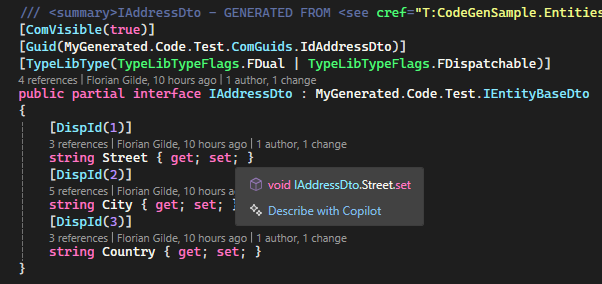
DTO Generation Automatically generate Data Transfer Objects (DTOs) from your classes and enums using attributes like this:
[AutoGenerateDto(ToDtoMethodName = "ToMegaDto", ToSourceMethodName = "AsSrc", IsComCompatible = true,
    Namespace = "MyGeneration"
)]
public class Address : EntityBase
{
    // ...
}
The mapping is generated as extension methods by default. With
MappingStrategy = DtoMappingStrategy.Mapperly(orDefaultMappingSettings.Strategyin the config) the generator emits a partial Mapperly mapper (e.g.ProductMapper) instead. Methods or a[Mapper]attribute you declare in your own part of that class replace the generated ones. Mapperly needs the files on disk, so setOutputPathandMappingOutputPath, and referenceRiok.Mapperly.DTO views: every further
[AutoGenerateDto]on a type generates one more DTO of it, with its own name (GeneratedClassName, required), members, renames and mapping, next to the default DTO:[AutoGenerateDto] // QuotationDto, quotation.ToDto() [AutoGenerateDto(GeneratedClassName = "QuotationAbp", // QuotationAbpDto, quotation.ToQuotationAbpDto() PropertyNames = ["DateCreatedUtc=CreationTime"], // renames, inherited members included UseViews = ["PortAbp"], // Port members become PortAbpDto PropertiesToIgnore = ["InternalNote"])] public class Quotation : BaseEntity { /* ... */ }A view is flat (inherited members included); one view on a common base type serves all derived entities. See DTO views.
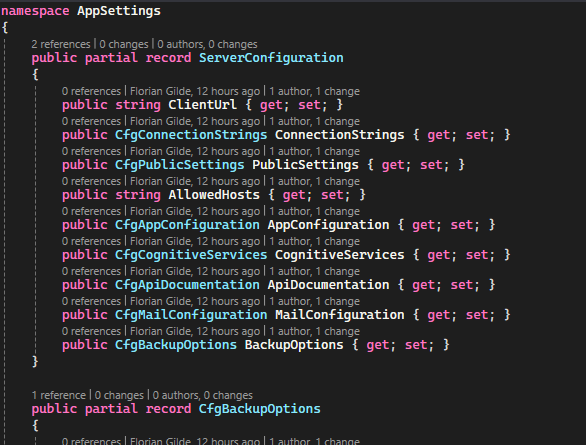
Class generation from XML or JSON files Generate strongly typed classes from JSON structures using the
StructureGenerationconfiguration. This is useful for configuration files or API responses.{ "SourceFile": "/Sources/appsettings.json", "RootClassName": "ServerConfiguration", "Namespace": "AppSettings" }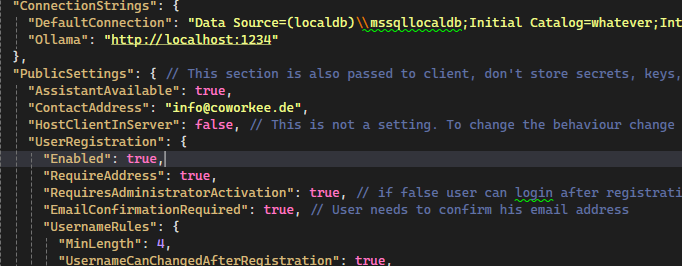
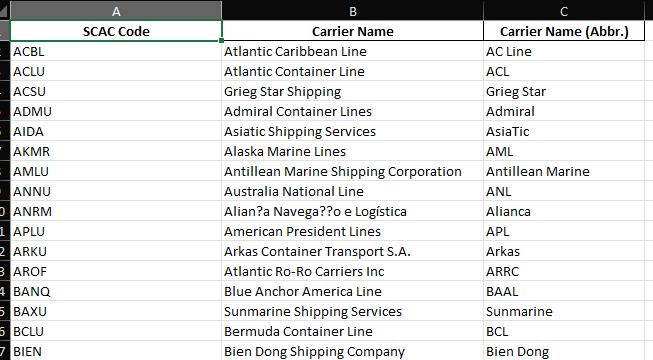
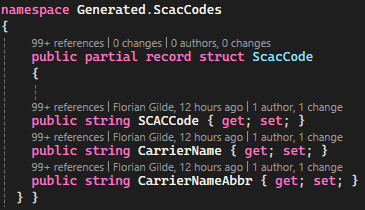
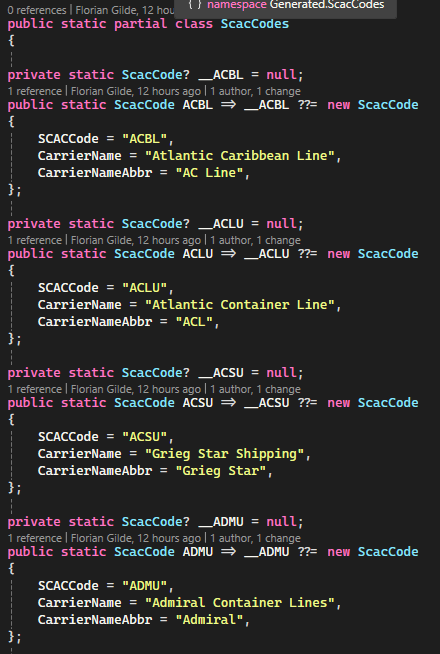
Class generation from Excel
"ExcelGenerations": [
  {
    "ModelType": "RecordStruct",
    "SourceFile": "/Sources/scac_codes.xlsx",
    "SheetName": null,
    "Namespace": "Generated.ScacCodes",
    "RootClassName": "ScacCode",
    "KeyColumn": "A",
    "HeaderRowIndex": 1,
    "DataStartRowIndex": 2,
    "GenerateModelClass": true,
    "GenerateStaticTable": true,
    "StaticClassName": "ScacCodes",
    "GenerateAllCollection": true,
    "OutputPath": "./Generated/Excel/"
  }
]
Source code documentation generation (
CodeToDocs)Generate documentation files directly from existing source files (e.g.
.cs,.razor,.html) using theCodeToDocsconfiguration. For every matching input file you can generate:- Plain text (
.txt) - Markdown (
.md) - HTML (
.html)
Example configuration:
{
  "DisableGeneration": false,
  "InputFolder": "./Entities",
  "OutputPath": "./Generated/HtmlDocs/",
  "FileIncludePattern": "*.cs",
  "SourceExportTypes": [ "PlainText", "Markdown", "Html" ]
}
Markdown output example:
- Plain text (
'''csharp
 public class Customer
 {
     public int Id { get; set; }
     public string Name { get; set; }
 }
 '''
Fluent configuration (recommended)
Configure the generators in code instead of (or on top of) attributes and codegen.json — like a ResponseFilter<T>. The classes are
found automatically and read at compile time, never executed; codegen.json becomes optional.
using Nextended.Core.CodeGen;

public sealed class ProductDtoConfig : DtoConfig<Product>
{
    public ProductDtoConfig()
    {
        Ignore(x => x.InternalNote);
        Property(x => x.Sku).PropertyName("ArticleNumber");
        View("ProductRow", v => v.Ignore(x => x.Tags).BaseMembersFirst().ToDtoMethodName("ToRow"));
    }
}

public sealed class AppCodeGen : CodeGenConfig
{
    public AppCodeGen()
    {
        Defaults(d => d.Namespace("MyApp.Contracts").OutputPath("./Generated/Dtos/"));   // = codegen.json "DtoGeneration"
        Dto<Entity>(e => e.Ignore(x => x.TenantId));                                     // every entity DTO and view
        Dto<Category>();                                                                  // no attribute needed
        ForNamespace("MyApp.Domain.Codes", n => n.Namespace("MyApp.Contracts.Codes"));
    }
}
Settings are named exactly like the attribute/json properties they mirror (short aliases: Name, Attribute(s), KeepAttributes);
precedence is json → fluent Defaults → attributes → ForNamespace → Dto<T>, and Dto<T> only refines what a type already gets. The
more specific member rule wins (Include on a derived type or view undoes an Ignore on its base). Anything dynamic is reported (NCG020-NCG026). Full reference:
Fluent configuration; runnable:
CodeGenFluentSample.
TypeScript generation
TypeScript declarations of your contracts that follow the server's serializer (camelCase, [JsonPropertyName], [JsonIgnore], enum
converters, [JsonPolymorphic] unions). Off by default: nothing happens without a generation with an OutputPath, the files are
written to disk (never compiled), unchanged files are not rewritten and stale ones are removed through a manifest.
public sealed class AppCodeGen : CodeGenConfig
{
    public AppCodeGen()
    {
        Typescript(t => t
            .OutputPath("../frontend/src/types/generated")
            .Preset(TypescriptPreset.Abp)                 // enums as numbers (Coworkee: strings), camelCase
            .IncludeNamespaces("MyApp.Contracts")         // or IncludeTypes("*Dto"), IncludeDerivedFrom(typeof(EntityDto<>)), FromGeneratedDtos()
            .RootNamespace("MyApp.Contracts")
            .TypeMap(typeof(PagedResultDto<>), "PagedResult from '../abp'"));
    }
}
The same as a Typescript list in codegen.json, or per type with [GenerateTypescript], [TypescriptIgnore], [TypescriptProperty].
Output: one file per type in namespace folders (or flat), relative import type, index.ts, explicit enum values, T | null for
nullable members. CI: dotnet build -p:NextendedCodeGenTypescriptCheck=true fails (NCG032) when the generated TypeScript is stale.
Opt-in per generation or per type: Header("...") (own header, "" = none, e.g. without /* eslint-disable */),
OptionalDefaultValues() (members with an initializer or [DefaultValue] optional, for request DTOs),
IncludeMembersWithAttribute<PublicConfigurationAttribute>() (only marked members, options without their secrets) and
Type<PlaceDto>(p => p.DerivedTypes("*")) (an abstract base becomes the union of its derived types without [JsonPolymorphic]).
ABP writes enums as numbers, OData as names: one generation per serializer (Preset(TypescriptPreset.Abp) and
EnumValues(TypescriptEnumValues.String), each with its own OutputPath).
Full reference: TypeScript generation; runnable:
CodeGenTsSample.
Usage
With this package you can generate DTOs, Interfaces and other code from your classes and enums. It is a code generation library that uses attributes to define how the code should be generated.
After adding the package to your project, you can use the AutoGenerateDto attribute to mark classes that should have DTOs generated.
Additionally you need to to add a config file as AdditionalFile, this can be empty but maybe you want to control the generation process more precisely, or you want to use one of the other 2 Features
like generate code from other sources like JSON or Excel files.
For this, you can specify the Config in a additional json file.
The configuration file is a JSON file that defines how the code should be generated.
You can specify the namespace, the output directory, and other options.
Additionally, you can generate classes from JSON or XML files using the StructureGeneration configuration.
This allows you to create strongly typed classes from JSON structures,
which can be very useful for configuration files or API responses.
To add your configuration file please add a json as an AdditionalFile in your csproj file like this:
  <ItemGroup>
    <AdditionalFiles Include="CodeGen.config.json" />
  </ItemGroup>
Sample of a configuration file:
{
  "DtoGeneration": {
    // Notice:: The whole DtoGeneration section is optional and can also be overridden if set on the Attributes.
    "ComIdClassName": "ComGuids",
    "ComIdClassPropertyFormat": "Id{0}",
    "ComIdClassModifier": "Public",
    "BaseType": null,
    "AddReferencedNamespacesUsings": null,
    "AddContainingNamespaceUsings": null,
    "PreInterfaceString": null,
    "PreClassString": null,
    "KeepAttributesOnGeneratedClass": false,
    "KeepAttributesOnGeneratedInterface": false,
    "Interfaces": null,
    "TypesToIgnore": null, // type names that get no DTO (also their AutoGenerateDerived subtypes)
    "KeepEnumFlagsAndUnderlyingType": false, // generated enums keep [Flags] and ": short" etc.
    "InitializeCollections": false, // collection properties start as []
    "DefaultMappingSettings": null, // e.g. { "Strategy": "Mapperly", "SkipReverseMapping": true, "MapDerivedTypes": true }
    "OneFilePerClass": true,
    "Usings": null,
    "CreateRegions": true,
    "CreateComments": true,
    "GeneratePartial": true,
    "Namespace": "MyGenerated.Code.Test",
    "Suffix": "Wanda",
    "Prefix": null
    //"OutputPath": "./Generated/Dtos/" // Output path for the generated files, if its null or unset the files will added to generation source
  },
  "StructureGenerations": [
    {
      "SourceFile": "/Sources/appsettings.json", // Path to the source file to generate from
      "RootClassName": "ServerConfiguration", // Name of the root class to generate
      "Namespace": "AppSettings", // Namespace for the generated class
      "Prefix": "Cfg", // Prefix for the generated class name
      "Ignore": [ // Ignore for example to create a partial class with the same name or for whatever reason
        "PublicSettings.Endpoints"
      ],
      "OutputPath": "./Generated/AppSettings/" // Output path for the generated file, if its null or unset the files will added to generation source
    }
  ],
  "ExcelGenerations": [
    {
      "SourceFile": "/Sources/scac_codes.xlsx",
      "SheetName": null,
      "Namespace": "Generated.ScacCodes",
      "RootClassName": "ScacCode", // Name of the root class to generate
      "KeyColumn": "A", // Column to use as key for the generated class e.g. "A" for the first column B,C etc.
      "HeaderRowIndex": 1,
      "DataStartRowIndex": 2,
      "GenerateModelClass": true,
      "GenerateStaticTable": true,
      "StaticClassName": "ScacCodes", //Name of the static class to generate
      "GenerateAllCollection": true,
      "ColumnMappings": {
        "Coordinates (lat,lon)": "Coordinates",
        "Change indicator": "ChangeIndicator"
      },
      "PropertyTypeOverrides": {
        "Coordinates": "Coordinates", // eigener Struct
        "LocationStatus": "LocationStatus",
        "LocationFunction": "LocationFunction"
      },
      "OutputPath": "./Generated/Excel/" // Output path for the generated file, if its null or unset the files will added to generation source

    }
  ]
}
To use this package, you need to add the Nextended.CodeGen package to your project and additionally for using the attributes you need to add Nextended.Core as well.
  <ItemGroup>
    <PackageReference Include="Nextended.Core" Version="10.1.22" PrivateAssets="all" GeneratePathProperty="true" />
    <PackageReference Include="Nextended.CodeGen" Version="10.1.22"  />
  </ItemGroup>
Please have a look at this sample project to see how to use the code generation features: Nextended.CodeGen.Sample
Supported frameworks
netstandard2.0
Dependencies
- Nextended.Core
- Microsoft.CodeAnalysis.CSharp
- ClosedXML
The Nextended family
The other 18 packages in the suite:
Core libraries
- Nextended.Core — Foundation library — extension methods, custom types (Money, Date, BaseId, SuperType), class mapping, deep clone, encryption, hashing and the code-generation attributes.
- Nextended.Cache — Expression-based caching — automatic cache keys from method expressions, CacheProvider with condition-based invalidation, thread-safe AddOrGetExisting.
Data access
- Nextended.EF — Entity Framework Core extensions — graph loading (LoadGraphAsync, IncludeAll, MultiInclude), declarative include definitions, paging, dynamic sorting and bulk operations.
ASP.NET Core & web
- Nextended.Web — ASP.NET Core utilities — zero-config OData (AddODataAuto), composable IQueryable OData appliers, strongly typed controller URLs, streaming download helpers and a background executor that can replay a captured request.
- Nextended.ResponseFilters — Fluent, provider-agnostic pipeline that redacts, masks, rounds, truncates, hashes, prunes and restructures response DTOs before serialization — per request, per user, per permission.
- Nextended.ResponseFilters.AspNetCore — ASP.NET Core adapter for Nextended.ResponseFilters — registers the pipeline as a global IAsyncResultFilter and replays structural edits against the serialized JSON tree.
UI libraries
- Nextended.Blazor — Blazor helpers — IBrowserFile extensions (bytes, data URLs, downloads), a hierarchical model for browsing inside uploaded zip/tar/rar archives, MIME-type detection and component-parameter reflection.
- Nextended.UI — WPF and Windows desktop helpers — a global input-binding manager with hold/sequence matching, DirectInput and XInput gamepad readers, key-bind capture controls, converters, behaviours, markup extensions and runtime-defined PropertyGrid types.
Code generation & tooling
- Nextended.Imaging — Image processing — aspect-preserving resize, crop, colour replacement, brightness-based foreground picking, thumbnail generation, byte/data-URL conversion and MIME detection from magic bytes.
- Nextended.CodeGen — Roslyn source generator — DTOs and interfaces from your entities, strongly typed classes from JSON/XML, lookup tables from Excel, documentation from source files, and TypeScript declarations of your contracts. (this package)
.NET Aspire hosting
- Nextended.Aspire — Conditional AppHost builder extensions — WithReferenceIf / WaitForIf / WithExplicitStartIf, strongly typed environment variables from config objects, HTTPS dev-cert wiring, Docker guards, GitHub-source resources and npm app discovery.
- Nextended.Aspire.Hosting.Supabase — The complete Supabase stack — Postgres, Auth (GoTrue), REST, Realtime, Storage, Studio, Kong and Edge Functions — as one composable Aspire resource.
- Nextended.Aspire.Hosting.N8n — The n8n workflow-automation platform as an Aspire resource, with Postgres persistence, workflow import and a typed client for triggering workflows from .NET.
- Nextended.Aspire.Hosting.Grafana — Grafana, Prometheus, Loki, Tempo, Promtail, cAdvisor, postgres_exporter and the OpenTelemetry Collector as composable resources with auto-provisioned datasources.
- Nextended.Aspire.Hosting.WebDataStudio — WebDataStudio — a browser database studio for PostgreSQL, MySQL, SQL Server, SQLite, Oracle, DuckDB, ClickHouse, MongoDB and Redis — wired to the databases of your stack, with accounts and roles, an optional SQL assistant, and an MCP endpoint for AI agents.
- Nextended.Aspire.Hosting.AspireUI — AspireUI — the visual AppHost builder — as a resource inside your own Aspire stack, with an optional pre-seeded admin user and a starter stack built from your project paths.
- Nextended.Aspire.Hosting.LocalAI — Self-hosted, OpenAI-compatible multimodal AI — image generation, text-to-speech, speech-to-text and video — with gallery model management, GPU support and Open WebUI.
- Nextended.Aspire.Hosting.Php — Run PHP endpoints inside your Aspire stack — a docroot folder or a single router script served by PHP's built-in web server, with php.ini settings as fluent options.
- Nextended.Aspire.Hosting.DbTools — Database tools for an Aspire app host. The first: fill a database resource from a database that already exists — schema and data — from another resource in the stack or from a server it does not model. PostgreSQL, SQL Server, MySQL/MariaDB, MongoDB and Redis, each through its own engine's dump and restore tools.
Links
- 📦 NuGet package
- 📖 Documentation — English
- 📖 Dokumentation — Deutsch
- 🏠 Documentation portal
- 🧪 Runnable sample
- 🧑💻 Source code
- 🐛 Report an issue
License
MIT — see LICENSE.
Learn more about Target Frameworks and .NET Standard.
-
.NETStandard 2.0
- Nextended.Core (>= 10.1.60)
NuGet packages (2)
Showing the top 2 NuGet packages that depend on Nextended.CodeGen:
| Package | Downloads |
|---|---|
|
Coworkee.CodeGen
Optional DTO and mapping generation for entities with Nextended.CodeGen, mapped by extension methods or Mapperly. |
|
|
UNLowCoder.Lib
Classes for the UNECE UN/Locodes |
GitHub repositories
This package is not used by any popular GitHub repositories.
| Version | Downloads | Last Updated |
|---|---|---|
| 10.1.70 | 89 | 11/23/2026 |
| 10.1.69 | 88 | 11/22/2026 |
| 10.1.68 | 90 | 11/22/2026 |
| 10.1.67 | 96 | 11/22/2026 |
| 10.1.66 | 423 | 11/19/2026 |
| 10.1.65 | 276 | 11/14/2026 |
| 10.1.64 | 154 | 11/13/2026 |
| 10.1.63 | 122 | 11/12/2026 |
| 10.1.62 | 106 | 11/12/2026 |
| 10.1.61 | 149 | 11/12/2026 |
| 10.1.60 | 91 | 11/12/2026 |
| 10.1.59 | 117 | 11/12/2026 |
| 10.1.58 | 99 | 11/11/2026 |
| 10.1.57 | 90 | 11/11/2026 |
| 10.1.56 | 87 | 11/11/2026 |
| 10.1.55 | 126 | 11/11/2026 |
| 10.1.54 | 95 | 11/11/2026 |
| 10.1.53 | 104 | 11/8/2026 |
| 10.1.52 | 99 | 11/6/2026 |
| 10.1.51 | 424 | 11/5/2026 |