heirowDebug.ProjectZ
2026.10.23.3
See the version list below for details.
dotnet add package heirowDebug.ProjectZ --version 2026.10.23.3
NuGet\Install-Package heirowDebug.ProjectZ -Version 2026.10.23.3
<PackageReference Include="heirowDebug.ProjectZ" Version="2026.10.23.3" />
<PackageVersion Include="heirowDebug.ProjectZ" Version="2026.10.23.3" />
<PackageReference Include="heirowDebug.ProjectZ" />
paket add heirowDebug.ProjectZ --version 2026.10.23.3
#r "nuget: heirowDebug.ProjectZ, 2026.10.23.3"
#:package heirowDebug.ProjectZ@2026.10.23.3
#addin nuget:?package=heirowDebug.ProjectZ&version=2026.10.23.3
#tool nuget:?package=heirowDebug.ProjectZ&version=2026.10.23.3
heirowDebug.ProjectZ

Native Project-Z live debugging for .NET 10 Windows applications. This package
is maintained beside heirowDebug.WPF in the same repository. The inspector,
launcher/injector and protection tool use Project-Z scenes and native controls.
It depends on the publicly published ProjectZ 2026.10.20.1 package.
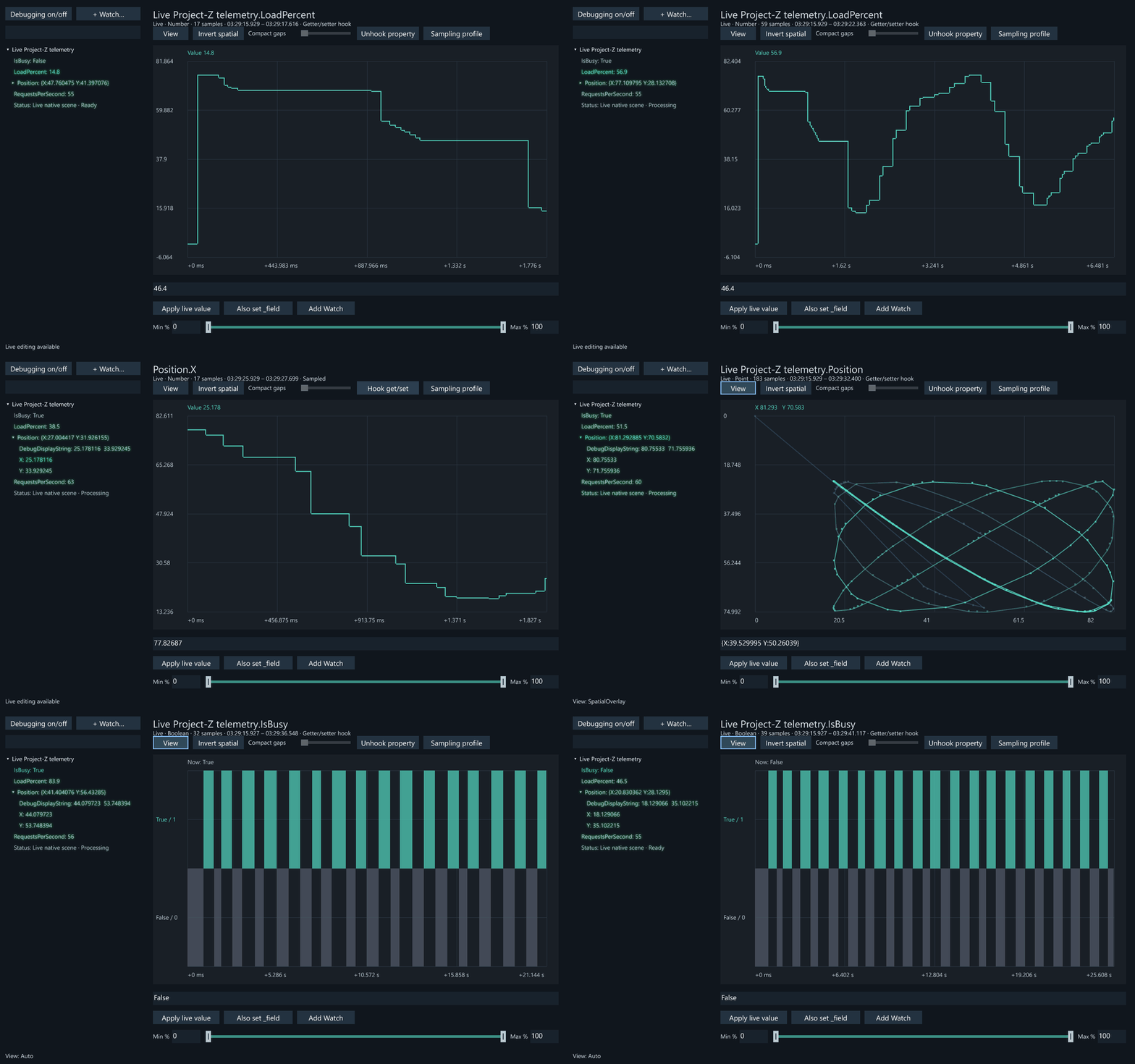
The recording shows the production native inspector watching sample telemetry with 16x AA/AF: labeled numeric axes and current values, a spatial trace, boolean state bands, property-access hooks and a frozen history range while background recording continues.
dotnet add package heirowDebug.ProjectZ --version 2026.10.23.3
using heirowDebug.ProjectZ;

// Run this on your scene's owning thread during initialization.
var watcher = new DebugWatcher(gameState, Recursive: false);
watcher.AttachScene(scene);
watcher.StartSession();
DebugWatcher.CreateDebugWindow();

// When the application shuts down:
// watcher.Dispose();
AttachScene samples and applies edits in Scene.FrameUpdated, avoiding
cross-thread access to the native UI and renderer. Plain .NET objects can also
be sampled without a scene, using a captured synchronization context or a timer.
Keep scene sampling attached to a scene that continues updating while debugging.
The native inspector includes object and static watches, a searchable watch
picker, lazy collection/object/struct expansion, live field/property edits,
optional underscore backing-field writes, elapsed-time histories, gap compression,
a dual-thumb history range with editable Min/Max percentages, and Auto, Time
series, Spatial overlay and Events views. The range uses the actual WPF
RangeSlider XAML through a native adapter. Drag either endpoint, drag the
selected interval to pan it, or use arrow keys (Space switches endpoints).
Moving Max below 100% freezes a copy of that value's history: incoming samples
and retention rollover cannot shift its graph, value labels or time axis.
Adjusting Min/Max continues to navigate the captured history. Recording continues
in the background; set Max to 100% to resume the live graph. Selecting a different
value captures that value's history when Max remains below 100%.
Numbers,
booleans, categories, colors, XNA geometry and ordinary .NET geometry have typed
visualizations. Sampling profiles match the WPF rates and retention limits.
Graph axes show numeric scales and elapsed time where applicable; channel
labels show the latest visible values. Tree arrows distinguish expanded and
collapsed objects, while scalar leaves have no arrow. Value and range inputs
disable spelling.
Event-driven property capture
Objects implementing INotifyPropertyChanged are observed automatically after
StartSession(). Their properties are read once initially, then only when the
matching change event arrives, including events from worker threads.
For ordinary managed properties, select one and choose Hook get/set. The inspector installs Harmony postfixes on that property's accessors. Getter returns and completed setter values enter the timeline immediately on the calling thread, so several changes between rendered frames are retained. A setter's final value is read after it returns, preserving clamping and normalization. Snapshots remain bounded; the native UI and watcher events update on their owning scene/context. Observation callbacks do not change arguments, return values or application exceptions.
The same control is available in code:
var value = watcher.Values.Single(value => value.Name == "Progress");
if (!value.TryEnablePropertyHooks(out var reason))
    Console.WriteLine(reason); // Notifications or sampling remain available.
// value.DisablePropertyHooks();
Unhook property restores the prior notification/sampling mode. Disposing a watcher removes its subscriptions and its accessor hooks without removing other watchers' hooks. Pausing a session pauses capture as well.
Runtime hooks can miss accesses already inlined by the JIT. They require managed method bodies and a runtime that supports detours; native/AOT accessors, by-reference returns and properties declared on value types are not hooked. Getter-only hooks observe application reads, not unseen backing-field writes. Fields and collection entries retain bounded sampling because they have no property accessor to intercept. Hooking is explicit rather than modifying every framework property in an injected application. Change notifications remain the preferred way to observe properties whose callers may already be inlined.
Reflection is bounded to 24 watchers, six children per parent, two recursive levels, 192 members per watcher and eight member reads per sampling pass by default. A single member getter executes application code and cannot be safely preempted; avoid watching getters that block. Automatic recursion is optional.
Build and launch the native tools:
dotnet run --project heirowDebug.ProjectZ.Tools -c Release
The injector renders the WPF injector's shared XAML with native Project-Z
controls. Select a process directly in the Process/PID/Window/Executable table;
mouse, keyboard selection and scrolling are supported. Refresh preserves the
selected process. The window uses 16x anti-aliasing and 16x anisotropic filtering.
The protection tool and telemetry demo can be opened with --protect-ui and
--demo, respectively.
The launcher finds accessible running Project-Z processes and restarts a selected
application with heirowDebug.ProjectZ.Hook. Save work before confirming a restart.
If an application hides to its tray instead of exiting after a normal close,
the injector preserves it and opens a separate debug instance.
The startup hook discovers live application roots without PDBs, then creates the
debugger on the target scene thread. Static property getters run only when a watch
is added or sampled, never while browsing. Applications with private roots can
register them with RootDiscovery.Register(scene) and unregister at shutdown.
The hook supports .NET 10 hosts that allow startup hooks; protected/native hosts
and older managed runtimes are outside this hook's contract.
Automatic discovery reads the live MonoGame game and native windows before scanning application types, so large applications and games held only in local variables remain discoverable. The hook uses the target's own loaded framework and renderer, including dependencies loaded from a bundle or by Fody/Costura.
The protection page uses the same ShieldService and native pre-runtime launcher
as the WPF tool: copy a deployment, obfuscate private names/strings, remove PDBs,
disable startup hooks/managed diagnostics/hot reload, and verify an integrity
inventory. Choose an empty output folder outside the original deployment. The
original deployment is preserved. This protection does not prevent administrator
or arbitrary native memory access.
ProjectZ 2026.10.20.1 supplies a self-contained diagnostics observer carrying its own runtime. The debugger ships that executable intact. A self-contained tools publish includes the application's runtime as well; neither requires installing the .NET 8 desktop runtime separately.
Run the core checks from a source checkout:
dotnet run --project tests/ProjectZ/ProjectZ.Tests.csproj -c Release
See the project documentation for the WPF debugger, native tools and Windows downloads.
| Product | Versions Compatible and additional computed target framework versions. |
|---|---|
| .NET | net10.0-windows7.0 is compatible. |
-
net10.0-windows7.0
- Lib.Harmony (>= 2.4.3)
- ProjectZ (>= 2026.10.20.1)
NuGet packages
This package is not used by any NuGet packages.
GitHub repositories
This package is not used by any popular GitHub repositories.
| Version | Downloads | Last Updated |
|---|---|---|
| 2026.10.24.1 | 27 | 10/24/2026 |
| 2026.10.23.5 | 45 | 10/24/2026 |
| 2026.10.23.4 | 47 | 10/24/2026 |
| 2026.10.23.3 | 37 | 10/24/2026 |
| 2026.10.23.2 | 47 | 10/24/2026 |
| 2026.10.23.1 | 44 | 10/23/2026 |
| 2026.10.20.2 | 57 | 10/21/2026 |
| 2026.10.20.1 | 49 | 10/21/2026 |